You come back from a shoot. Maybe a wedding, maybe an event, maybe a wildlife session or a portrait shoot. Whether you're a pro photographer or a serious enthusiast – the story is the same. Memory card in, import running, you grab a coffee. Thirty minutes later you're sitting in front of 1,847 RAW files trying to decide which ones to keep.
You click on image 1. One second of wait, then it's sharp. Click on image 2. One second. Image 3. One second. For 1,847 images that's more than half an hour of pure waiting – if everything's going well. If the computer is older or the RAWs come from a 45-megapixel camera, more like two hours.
It grates. And the reason it works that way frankly annoyed me when I first understood it.
The double image in your camera
When you press the shutter, your camera doesn't take one image – it takes two.
One is the RAW – raw sensor data, unprocessed, the one you actually want.
The other is a full JPEG. Your camera needs it for itself, to show you a preview on the rear display the moment you take the shot. It packs this JPEG unasked into the RAW file as an attachment. On most modern cameras it's a high-resolution JPEG – often even full resolution – properly developed, ready to display instantly.
Which means: every one of your 1,847 RAW files already has a finished preview image inside. Exposed by the sensor itself, developed by the camera's engine, ready to show in milliseconds.
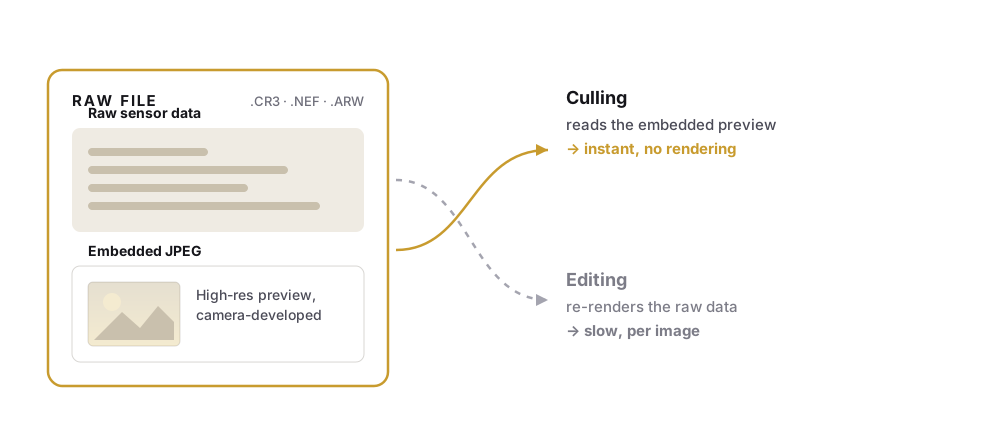
And here's what got me: most programs ignore this JPEG completely.
Lightroom loads the RAW from scratch and rebuilds the image from the ground up – for every single click. Just so you can look at it to decide whether to keep it.
Hours of it. For a task where you really just want to decide sharp/blurry, keep/toss.
Why do they do it that way?
There's a good reason – for editing. If you push the exposure up two stops, or pull the highlights back, or apply a lens profile, you need the raw sensor data. The embedded JPEG has all that baked in already. Anyone editing has to re-render. Already while you're culling, FlashView shows you via its histogram (H) whether the highlights are clipping or how much reserve the RAW still holds – the 'recoverable in RAW or gone?' call happens right in the keep/toss phase, without switching into editing.
But for culling you don't need that.
When you cull, you decide one thing: keep or toss. You need sharpness, composition, eyes open, smile, animal in focus? That's exactly what the camera preview is perfect for. It shows you the image the way the camera meant it. Exactly the information you need to sort.
Tools that don't make this distinction – that always render as if you need to edit every image right now – force you through unnecessary work. Hours of it. Per shoot.
Two kinds of photo tools
Once you look around, you notice: the programs in this market split into two camps.
One camp works with catalogs. Lightroom is the best-known, Capture One, ON1, ACDSee all belong here. You import your images into a database, the program builds previews in advance, keeps track of every version. Very powerful. But expensive to set up: when you point it at a new archive, the import takes a while. And if you throw an old, huge archive at it all at once, it often turns into a test of patience.
The other camp works file-based. You open a folder, the program shows what's inside. That's it. No database, no import, no setup. Photo Mechanic is the established pro standard here. FastStone Image Viewer and IrfanView are well-known in this category too.
Most file-based tools know the embedded-JPEG trick. That's why they're fast. The catalogs can use it too – Lightroom has an Embedded & Sidecar preview option – but in real use Lightroom still drags, because so much workflow baggage runs around it.
Where the file-based tools have their gaps
Here's where it gets honest. Not every file-based tool covers every use case.
Photo Mechanic is top-tier, does nearly everything, but costs $149 a year or $299 once. If you go through thousands of images daily for a living and have an established pro workflow, take a look. Recursive browsing across subfolders works via right-click → Open Folder and Subfolders in New Contact Sheet.
FastStone Image Viewer is widely used and free for personal use. But: the initial read of a large folder is slow, thumbnails generate sluggishly, and recursive browsing across subfolders isn't available. Fine for small collections, not practical for a grown archive.
IrfanView is the classic – popular for ages, free for personal use. It has a thumbnail viewer in an external window – that looks and feels like Windows 3.1. It loads thumbnails from all subfolders only on request and forgets that at the next folder change. And according to its own FAQ it develops every RAW in full instead of using the embedded preview.
Lightroom Classic can technically do almost everything – embedded JPEG can be enabled, recursive subfolder display is even on by default. But: before you can use it, you have to import. And the catalog becomes a brake above a certain size.
| Tool | file-based (no import) |
embedded JPEG | recursive subfolders | price |
|---|---|---|---|---|
| Photo Mechanic | ✓ | ✓ | ✓ | from $149/year |
| FastStone | ✓ | ✓ | ✗ | free (personal) |
| IrfanView | ✓ | ✗ (develops in full) | only on request | free (personal) |
| Lightroom Classic | ✗ (catalog) | ✓ optional | ✓ | subscription |
| FlashView | ✓ | ✓ | ✓ | one-time |
That's the gap FlashView came out of.
The idea was: the file-based tools have the right approach, but nobody builds it modern, fast and just-get-going all at the same time.
An example from my own day. Double-click an image in Explorer. FlashView opens, the image is right there, full size. Arrow keys in any direction – flip straight to the next. CTRL+C, the image is in the clipboard. WhatsApp open, CTRL+V, sent. One key back to the overview – FlashView remembers where I was and jumps straight to the right spot, whether I was in a single folder or in recursive mode before. From there into the next folder. All without import, without catalog, without waiting.
Same thing at scale. My entire photo directory as root. 100,000 images is tested, recursive across all subfolders. Instantly browsable. No setup, no init phase. One-time purchase, not a subscription.
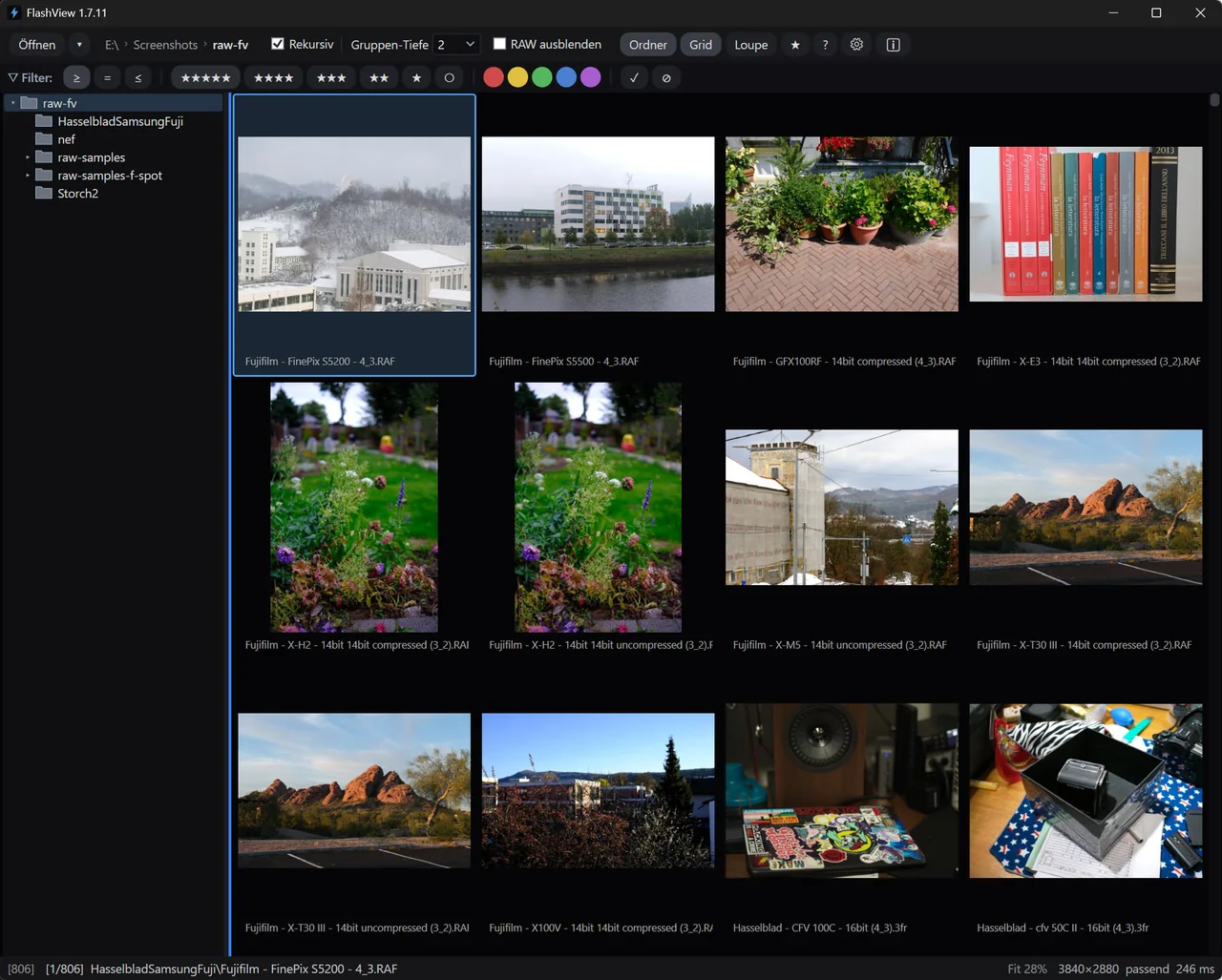
The embedded JPEG is the technical foundation. But the actual difference is the lightness. It's built to start immediately – whether you want to share one image or cull an entire shoot.
What do you use when?
Honest, because the answer isn't "always FlashView":
- If you're a wedding or sports pro and already know Photo Mechanic – stay with it. It works, you know it, that's worth more than 0.1 seconds per image.
- If you use Lightroom for editing: you don't have to do everything there. Cull in FlashView, then import only the selected images into Lightroom and edit there. Best of both worlds – the time-consuming part (culling) runs fast, and the detail work happens where it belongs. For the quick corrections you no longer have to switch at all: press E and FlashView develops the RAW itself – demosaiced, 16-bit linear, as-shot white balance, and exposure, tone curve and color on top of that. You move to Lightroom for what goes beyond: lens profiles, masking, extreme recovery.
- If you have a small archive of a few thousand images and don't want to spend anything – FastStone or IrfanView are fine for occasional clicking through.
- If you have a large archive and want to get going fast – as an enthusiast photographer, semi-pro or pro who finds pro-tool complexity too much – FlashView is built for that. Modern UI, no program forcing you to build something up first.
What's left
Picture the scene from the opening one more time. You, coffee, 1,847 RAWs. Only now with a tool that knows the trick – culling takes a few minutes instead of half an hour, and at the end you don't get up exhausted, you get up with the set you actually wanted to take.
That's the small change that makes a big one in daily work.
If you'd like to try FlashView for that, it's at flashview.net. What the culling workflow looks like in the individual genres, where the requirements shift, is in separate articles: weddings, events, sports, concerts, wildlife and people.